
DesignSense AI
Sictec Infotech Inc.Art & Design
3.215.00 Reviews
- Version
- 27
- Installs
- 100.00K
- Age Rating
- Everyone
Screenshots
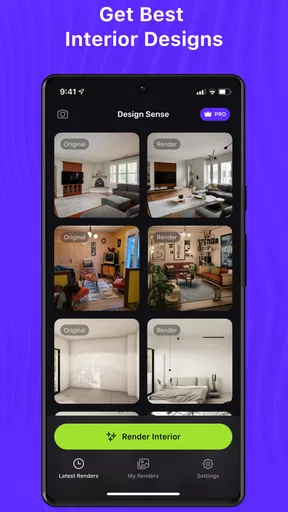
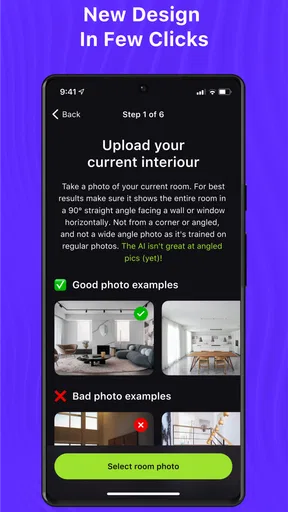
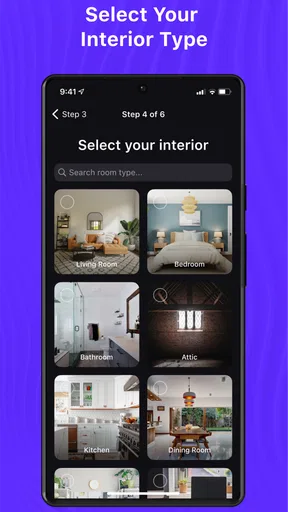
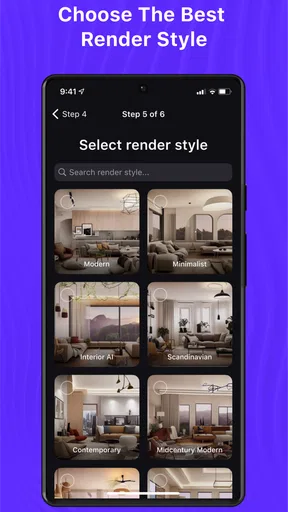

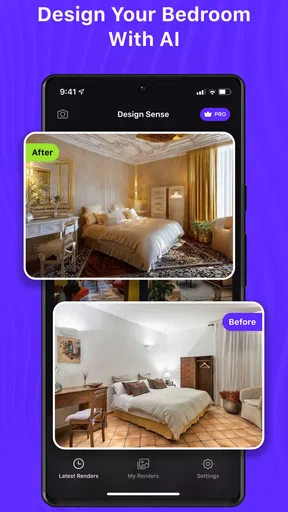
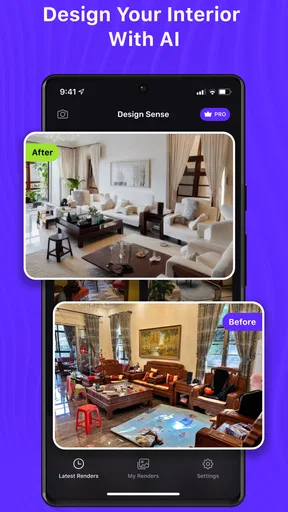
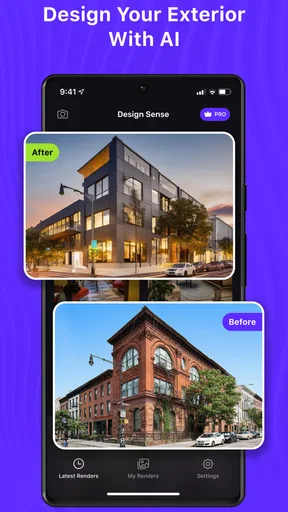
Our Review of DesignSense AI
 Analysis by Appyee
DesignSense AI is the kind of interior design app I would open when I have a room that feels wrong but cannot yet explain why. Rather than starting with a blank canvas and expecting me to understand professional design software, it presents itself as an approachable way to explore room ideas on a phone. That makes it especially interesting for renters, first-time decorators, and anyone who wants visual direction before buying furniture or changing a space.
My overall impression is mixed but useful. The app can help turn a vague decorating problem into something easier to discuss, compare, and refine. At the same time, an AI design concept should be treated as inspiration, not as a construction plan or a guarantee that every suggested item will fit. The strongest experience comes when I use it to make decisions, not when I expect it to replace careful measuring and personal taste.
What to expect before you begin
DesignSense AI belongs to the Art & Design category and is developed by Sictec Infotech Inc. It is free to install, with optional in-app purchases listed from $5.99 to $400.00 per item. That pricing range is important to keep in mind before I spend much time exploring: the initial download does not automatically mean every part of the experience is free.
The app has an Everyone content rating, so its subject matter is suitable for a broad audience. It was released on March 23, 2023, and the current version is 27, requiring Android 8.0 or later. It has passed the point of being a brand-new experiment, with more than 100 thousand installs, although its average rating sits at 3.2 from roughly 1.4 thousand ratings. I read that combination as a reason to approach it with curiosity rather than assuming the experience will be perfect for every phone or decorating style.
The store summary calls it a revolutionary interior design app, while the short description identifies it as DesignSense AI. In practical terms, I would frame it more modestly: this is a visual idea generator for interior spaces. That distinction matters. A generated room can help me see a possible direction, but it does not know the exact dimensions of my room, the weight-bearing limits of a wall, the quality of a material, or whether a real product will look identical to an image.
Before opening it, I would decide what problem I want to solve. “Make my room nicer” is too broad to guide a useful experiment. “Help me choose between a warm minimal look and a darker modern look for this living room” is much better. A clear starting question gives the app a job and makes it easier to judge whether the result is genuinely helpful.
Who will get the most from it
I think the best audience is someone at the beginning of a decorating project. If I have an empty room, a tired bedroom, or a home office that never feels comfortable, visual suggestions can help me discover preferences I could not describe in words. The app may also be useful for preparing a conversation with a partner, family member, landlord, or professional designer because an image gives everyone something concrete to react to.
It is less suitable for a person who already has a detailed floor plan and needs exact furniture placement. It is also not the right tool for technical renovation work, electrical planning, structural changes, or a final purchasing decision. For those tasks, I would choose a measuring app, a proper floor-planning tool, or advice from a qualified professional. DesignSense AI is more valuable during the imaginative stage than during the engineering stage.
Getting through the first setup
My advice for a first session is to keep the goal small. Start with one room and one design question instead of trying to redesign the entire home. If the app asks me to begin with an image or a description, I would use a clear, well-lit view and make sure the main furniture is visible. A cluttered or oddly cropped starting point makes it harder to judge whether the design idea is useful.
I would also prepare a short description that includes the room’s purpose and the feeling I want. For example, a home office might need to feel calm and bright, while a living room might need to feel welcoming without looking crowded. Adding those priorities is more useful than piling on a long list of fashionable words. The goal is to give the visual system a direction it can interpret.
One practical habit is to take a reference photo from a normal standing position rather than from an extreme corner. A dramatic angle can make a room appear larger or smaller than it really is. If I use the app to explore ideas from a realistic viewpoint, I am less likely to become attached to a result that could never translate well to the actual space.
I would not begin by entering sensitive personal information or uploading photographs that reveal more of my home than necessary. A simple room image is enough for the design task. Keeping the first test limited also makes it easier to decide whether the workflow feels comfortable before I invest further attention or consider any purchase.
The first meaningful success
The first successful action is not merely producing an attractive image. For me, success means generating an idea that answers a real question. If my room feels cold, I want to learn whether warmer colors, softer lighting, or more natural-looking materials could change that impression. If the space feels cramped, I want to explore whether a lighter visual scheme and simpler furniture arrangement might help.
After receiving a design concept, I would pause before accepting it as a recommendation. I would identify three elements that seem practical and three that do not. Perhaps the color balance works, the wall treatment is appealing, and the seating arrangement feels more social. On the other hand, a suggested table may be too large, a walkway may be blocked, or the amount of decoration may be unrealistic for everyday life.
This comparison turns the app into a decision aid. Instead of asking, “Is this picture beautiful?” I ask, “Which part of this picture solves my problem?” That is a much more reliable way to use an AI design tool. I can borrow the useful direction while rejecting details that do not suit my room, budget, maintenance habits, or household.
A particularly effective workflow is to create a small set of contrasting directions rather than endlessly chasing one perfect image. I might compare a warm neutral approach with a brighter contemporary one, then note which features appear repeatedly in the versions I prefer. If I keep choosing open shelving, rounded shapes, or muted colors, I have learned something about my own taste even if none of the generated rooms is ready to copy.
Another non-obvious benefit is that the app can help expose hidden priorities. I may think I want a dramatic style, then realize that I consistently prefer the calmer version because it leaves more visual breathing room. That kind of discovery is valuable before I spend money. It can prevent the common mistake of buying individual items that look exciting alone but do not create a comfortable whole.
Where first-time users may feel confused
The most likely confusion is the difference between a visual suggestion and a precise representation of reality. AI-generated interiors can make furniture proportions, lighting, textures, and object placement look convincing even when those details are not dependable measurements. I would use the result to discuss mood and composition, then verify every practical detail separately.
There is also a risk of reading a design image as a shopping list. A recognizable-looking sofa or lamp in a concept does not mean that the exact product is available, affordable, or suitable for the room. Before buying anything, I would measure the space, check doorways and walking paths, confirm dimensions from the retailer, and compare materials in person when possible.
The free download and optional purchases can create another point of uncertainty. I would read each purchase screen carefully and avoid assuming that a feature, generation, or extended workflow is included simply because the app itself costs nothing to install. The listed purchase range reaches from a modest amount to a very high per-item maximum, so I would be particularly careful with confirmation screens and any recurring wording that may appear during checkout.
The average rating also suggests that expectations should be managed. A 3.2 average is not a reason to dismiss the app, but it does tell me that the experience may have rough edges or may work better for some users than others. Phone performance, image quality, prompt clarity, and personal expectations can all influence whether the result feels impressive or disappointing.
If an output looks attractive but ignores the room’s actual constraints, I would not keep repeating the same request without changing my input. I would simplify the goal, describe the room’s purpose more clearly, and focus on one design decision at a time. This is a useful trade-off: broader instructions can produce more surprising ideas, while narrower instructions are usually easier to evaluate.
Using it in an everyday decorating decision
Imagine I have moved into a rental apartment where the living room contains a large sofa, a small television stand, and very little storage. The room feels unfinished, but I cannot paint the walls or make permanent changes. I could use DesignSense AI to explore a lighter, calmer arrangement with removable decoration, then compare whether the visual balance improves when storage is kept low and the walls remain simple.
I would treat the generated result as a conversation starter. If it suggests a style that feels too formal, I can identify the specific reason: perhaps the colors are too cool, the furniture looks too sparse, or the decorative objects would be difficult to maintain. That gives me a clearer shopping brief. Instead of wandering through stores looking for “something nice,” I can look for a compact storage piece, a warmer textile, or lighting that supports the atmosphere I actually want.
The same approach works for a bedroom refresh. I might use the app to compare a restful neutral direction with a more colorful one, then evaluate the result against real habits. Does the proposed room leave enough space beside the bed? Would the fabrics be easy to wash? Is the visual calm worth giving up storage? These questions keep the design grounded in daily life rather than in a polished image.
For a home office, the trade-off becomes even clearer. A beautiful concept may prioritize appearance but forget cable management, screen glare, chair comfort, or the need to move around during the day. I would use the app to explore color and atmosphere, then use a separate planning method for desk depth, monitor position, and storage. This division of labor is one of the smartest ways to avoid overestimating what the app can do.
How it compares with familiar alternatives
Compared with searching image boards or scrolling through social media, DesignSense AI offers a more direct path from my own room to a tailored visual direction. Inspiration galleries are excellent for discovering styles, but they often show spaces with different proportions, budgets, and architectural features. An AI-based design workflow can feel more relevant because I begin with my situation rather than with someone else’s finished project.
Compared with a traditional floor-planning app, however, the balance changes. Floor planners are usually better when I need accurate placement, dimensions, circulation, and a reliable sense of scale. They can take longer to learn, but that effort pays off when I am deciding whether a real sofa, cabinet, or dining table will fit. DesignSense AI is quicker for atmosphere and visual experimentation, while a planning tool is stronger for precision.
Compared with hiring an interior designer, the app is more accessible for early exploration and private experimentation. I can test ideas without arranging a consultation, and I can change direction quickly. A professional still has the advantage when the project involves a difficult layout, custom work, lighting plans, accessibility needs, or a large budget. I would see the app as preparation for that conversation, not a replacement for professional judgment.
Compared with simply taking photos and editing them manually, the appeal here is the possibility of moving beyond small cosmetic changes. Manual editing gives me control, but it can be time-consuming and may require design skill. The AI route is faster for generating alternatives, although it gives me less certainty about how faithfully the result represents the actual room.
Small habits that improve the experience
I would save notes alongside any design concept I like. Writing down the colors, shapes, materials, and layout ideas that matter prevents me from treating the entire image as one indivisible package. It also makes the next step practical: I can translate a visual impression into a short list of changes that are realistic for my home.
I would also compare concepts under the same real-world conditions. If one image is bright and another is dark, I might mistakenly judge the style rather than the design. Keeping my room’s purpose and main constraints consistent makes the comparison fairer. The most useful result is not always the prettiest one; sometimes it is the version that reveals a workable improvement.
Another helpful rule is to use the app before shopping, not after. Once I have bought an expensive item, I am more likely to defend it and force the rest of the room around it. Exploring first gives me permission to reject ideas cheaply. This is where the app can save more than money: it can save time, returns, and the frustration of living with a choice that looked better in isolation.
Finally, I would revisit my own preferences after each session. AI suggestions can pull me toward styles that photograph well but do not feel comfortable. If I keep choosing designs that are simple, warm, and easy to maintain, that pattern is more trustworthy than any single generated image. The app is most useful when it helps me understand my taste rather than persuading me to imitate a trend.
My recommendation after testing the idea
I would recommend DesignSense AI to a first-time decorator who wants a gentle way into interior design and understands that the output is a starting point. Its strongest role is helping me move from uncertainty to a few concrete visual directions. It can be especially helpful when I need to explain a preference to someone else or decide what kind of atmosphere I want before looking at real products.
I would skip it, or use it only alongside another tool, if my main need is exact room planning. Anyone making structural changes, ordering custom furniture, or working within tight accessibility and clearance requirements should verify everything with measurements and appropriate expertise. The app’s visual confidence should never be mistaken for physical accuracy.
The free entry point makes it reasonable to try, but I would approach optional purchases carefully and judge the experience on whether it solves my particular design question. The rating of 3.2 tells me not to expect a flawless, universal solution, while the installed base shows that enough people are curious about this approach to make a trial worthwhile.
My practical advice is to use the app for direction, then switch to measurement and real-world checking before spending money. If I follow that boundary, DesignSense AI becomes a useful creative companion: not a substitute for a designer, architect, or tape measure, but a quick way to see possibilities that might otherwise remain stuck in my head.
For a first session, I would choose one room, prepare one clear goal, create a small comparison of styles, and write down the elements that genuinely improve the space. That path makes the experience less overwhelming and gives me a meaningful result even if the first concept is imperfect. In my view, that is where DesignSense AI earns its place among mobile interior design tools: it helps begin the conversation between imagination and a room I can actually live in.
Verdict
Strengths of DesignSense AI
- Creates polished design concepts quickly from simple prompts.
- Useful for exploring multiple visual directions before committing.
- Helps non-designers produce professional-looking creative assets.
- Can speed up brainstorming for branding, layouts, and marketing materials.
- Convenient for generating ideas directly from a mobile device.
Limitations of DesignSense AI
- AI results may need manual editing to match your exact requirements.
- Some generated designs can look repetitive or overly generic.
- Advanced tools or higher usage limits may require a paid plan.
- Text placement and typography may occasionally need correction.
- Results depend heavily on the clarity and detail of your prompts.
Similar Picks in This Category
View All
Canva: AI Photo & Video Editor
Canva4.8

PENUP – Drawing-sharing SNS
Samsung Electronics Co., Ltd.4.5

Crafto
Kutumb App4.6

Sketchbook
Sketchbook4.1

ibis Paint X
ibis inc.4.5

Adobe Express: AI Photo, Video
Adobe4.6
Frequently Asked Questions
What is DesignSense AI and what can I use it for?
DesignSense AI is an artificial intelligence design assistant intended to help users develop, refine, and explore visual concepts more efficiently. Depending on the available tools, it may support tasks such as generating ideas, creating design variations, improving layouts, or receiving suggestions about colors, typography, and composition. It is best viewed as a creative aid rather than a complete replacement for professional design judgment and editing skills.
Is DesignSense AI suitable for beginners, or do I need design experience?
The app is generally aimed at making design workflows more approachable, so beginners can use it to experiment with concepts without mastering advanced software first. At the same time, users with professional experience may appreciate it for brainstorming and speeding up repetitive tasks. You should still understand basic visual principles, because AI-generated results may require manual corrections, better instructions, or several attempts before they match your intended style.
Does DesignSense AI require an internet connection or an account?
AI-powered design features commonly depend on cloud processing, meaning an active internet connection may be required when generating content, analyzing designs, or synchronizing projects. The app may also ask you to create an account so designs can be saved across devices or connected to a subscription. Before downloading, check the current store listing and privacy information for login requirements, supported platforms, and whether any offline functionality is available.
Is DesignSense AI free to download and use?
DesignSense AI may be available to download without an upfront charge, but some of its advanced capabilities can be restricted by usage limits, credits, advertisements, watermarks, or a paid subscription. Pricing and included features can change between Android and iOS or after updates. Review the in-app purchase details carefully before starting a trial, especially if the subscription renews automatically after the trial period ends.
Can I use designs created with DesignSense AI for commercial projects?
Commercial usage depends on the app’s current terms of service, the selected plan, and the sources used to generate each result. AI output may also resemble existing artwork, trademarks, or copyrighted material, so you should review and customize designs before publishing them professionally. Do not assume that every generated image, template, font, or asset is automatically cleared for advertising, resale, branding, or client work.
